Your own Kubernetes cluster, run for you.
A real Kubernetes cluster without the setup: no headaches, no complicated networking, nothing to wire up. Ideal for learning and early production. Outgrow it and your manifests move to an HA cluster unchanged.
A real cluster, none of the toil
Standard Kubernetes you reach over a kubeconfig: nothing to set up, and nothing locked in when you outgrow it.
Single-tenant by design
Every order is its own cluster. No shared control plane, no noisy neighbours. The API server and node are yours alone.
We run it for you
We stand up your cluster and hand you a working kubeconfig. Nothing to provision, no bootstrap to babysit, and if the server fails we restore your cluster from a nightly snapshot.
Standard, portable Kubernetes
Your kubeconfig grants full cluster-admin on a stock, unmodified cluster. Install any operator, CRD or ingress, and move the same manifests to an HA cluster when you outgrow it.
Ingress included
Tick a box at order time and we provision an ingress controller with your cluster, so your services are reachable from the first deploy.
European infrastructure
Runs on dedicated Hetzner servers in the EU: GDPR-friendly, low latency from Europe, and price-to-performance that is why €24 buys a whole cluster.
Transparent pricing
One flat price per cluster, billed monthly. Cancel anytime and billing stops at the end of the period. No seats, no surprise egress bills.
Skip the Docker Compose to Kubernetes rewrite
Most side projects run on Docker Compose until the day they outgrow one box, and then the move to Kubernetes means rewriting everything. skube lets you start on real Kubernetes at hobby scale and hobby price, so you pay the learning curve once, on day one, and never hit that cliff.
How the Compose migration works →Today, on skube1
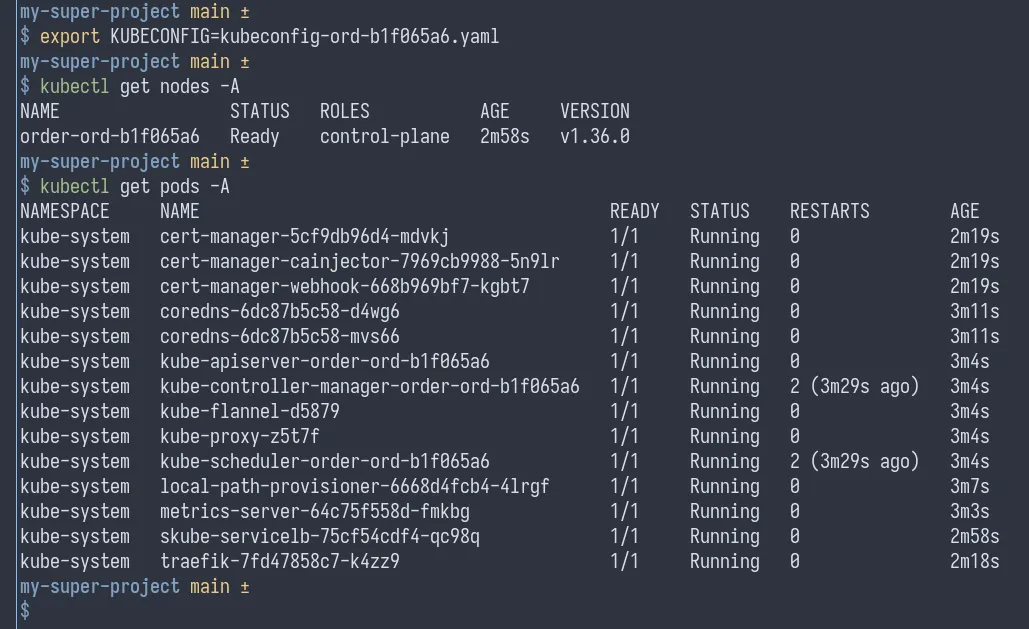
Write standard manifests and ship them to your cluster.
kubectl apply -f ./manifestsLater, on an HA cluster
When uptime matters, the same manifests apply, unchanged. No rewrite, no lock-in.
kubectl apply -f ./manifestsHow skube compares
Same RAM, same storage, an ingress, on EU infrastructure. One flat monthly price per cluster, next to what the managed clouds meter separately.
| skube | EKS | GKE | |
|---|---|---|---|
| skube12 vCPU · 4 GB · 40 GB | €24 flat | from ~€108 est.t3.medium · 2 vCPU · 4 GB | from ~€107 est.first cluster from ~€43e2-medium · 2 vCPU · 4 GB |
| skube24 vCPU · 8 GB · 80 GB | €59 flat | from ~€137 est.t3.large · 2 vCPU · 8 GB | from ~€135 est.first cluster from ~€71e2-standard-2 · 2 vCPU · 8 GB |
| skube38 vCPU · 16 GB · 160 GB | €109 flat | from ~€196 est.t3.xlarge · 4 vCPU · 16 GB | from ~€189 est.first cluster from ~€125e2-standard-4 · 4 vCPU · 16 GB |
| Pricing model | Flat | Control plane + nodes + egress, metered | Cluster fee + nodes + egress, metered |
| Traffic / egress | 20 TB included | Metered per GB | Metered per GB |
| Disaster recovery | Nightly snapshots included | DIY or paid add-on | Paid add-on |
| High availability | No, one dedicated node | Multi-AZ control plane, node groups | Regional clusters, multi-zone |
| Autoscaling | No, fixed size per cluster | Node groups, Karpenter | Node pools, Autopilot |
| Setup to first kubeconfig | One order form | VPC, IAM, node groups, add-ons | Project, node pools, IAM |
| Who runs it | We do, end to end | Control plane managed; nodes, upgrades, add-ons on you | Control plane managed; node pools on you |
| Standard, upstream k8s | Yes, stock | Conformant, AWS add-ons | Conformant, GCP add-ons |
| EU data residency | EU only | EU regions | EU regions |
How these estimates work, disclaimer & trademarks
Competitor estimates use the cheapest instance matching each tier's RAM (see More info for instance and vCPU), the same SSD, and one load balancer with minimal egress; publicly available prices as of 2026-07-06, excl. tax (skube prices shown include VAT), USD converted at €1 = $1.1424. Headline GKE figures exclude its cluster-fee credit; the "first cluster" line includes it (the credit covers one zonal cluster per account; the fee applies from the second cluster on). Competitor pricing and features change; check each provider's own site for current details.
EKS, GKE and Kubernetes are trademarks of their respective owners, used here for identification only; their owners do not endorse skube.
How it works
From order to kubeconfig in three steps.
Pick a size
Pick a cluster size and place your order.
We provision it
We stand up a fresh cluster for you, verify it is healthy, and email you the moment it is live: typically within hours, always within one business day.
Get your kubeconfig
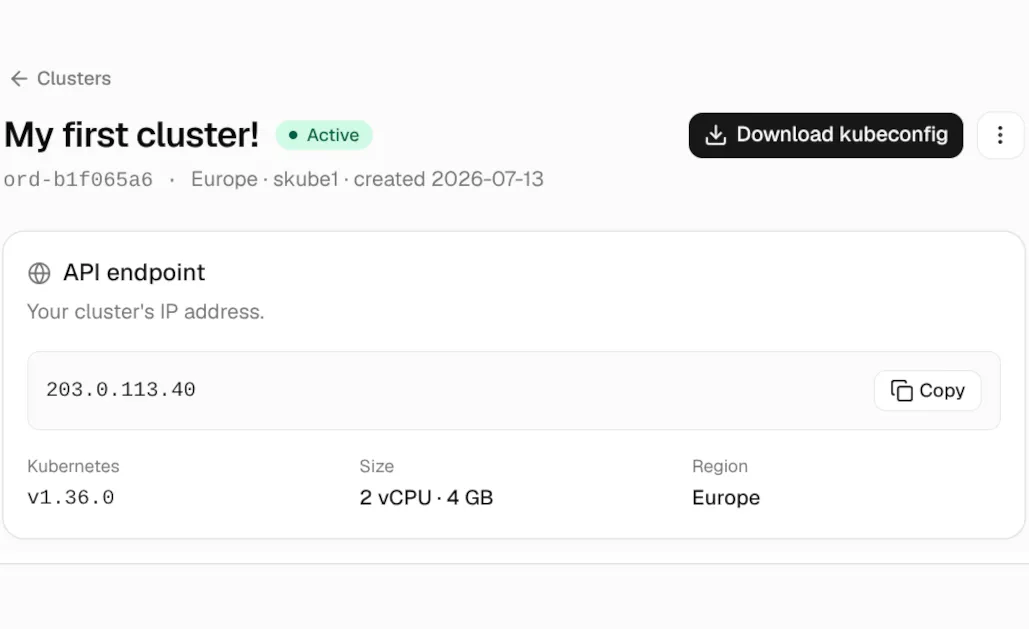
Download your kubeconfig from the dashboard, and start shipping.
Simple, per-cluster pricing
One flat price per cluster, billed monthly. Each size is a dedicated single-tenant cluster on its own server. Cancel anytime.
skube1
2 vCPU · 4 GB · 40 GB SSD
A handful of small apps: side projects, staging, experiments.
- ✓ Single-tenant cluster
- ✓ Full cluster-admin
- ✓ Ingress included
- ✓ 20 TB traffic included
- ✓ Nightly backups
- ✓ Email support
- ✓ Cancel anytime
skube2
4 vCPU · 8 GB · 80 GB SSD
Early production: an app with real users, side projects alongside.
- ✓ Single-tenant cluster
- ✓ Full cluster-admin
- ✓ Ingress included
- ✓ 20 TB traffic included
- ✓ Nightly backups
- ✓ Email support
- ✓ Cancel anytime
skube3
8 vCPU · 16 GB · 160 GB SSD
A busy cluster: many apps and bigger databases, side by side.
- ✓ Single-tenant cluster
- ✓ Full cluster-admin
- ✓ Ingress included
- ✓ 20 TB traffic included
- ✓ Nightly backups
- ✓ Email support
- ✓ Cancel anytime
Cancel anytime; EU consumers have a 14-day right of withdrawal. See pricing details.
Frequently asked
- Is a single node enough?
- For learning, staging and most early-production workloads, yes. Even the smallest size (2 vCPU / 4 GB, dedicated) comfortably runs a typical web app, its database and ingress for your first few thousand users. skube runs on skube: this very website is served from our own single-node cluster. And when multi-node HA starts paying off, your manifests move to an HA cluster unchanged.
- Can I run more than one app on a cluster?
- Yes, Kubernetes was built for that. Separate apps with namespaces and route each domain through the included ingress controller. Even a skube1 comfortably runs several small apps side by side; the only limit is the node’s resources. One flat price, as many apps as fit.
- Can I run more than one cluster?
- Yes. Each order is its own dedicated cluster, so for a second environment like staging, just place another order.
- Who runs it?
- We provision and stand up the cluster for you and keep the base healthy. You get full cluster-admin, so everything inside the cluster is yours to run.
- What happens when I outgrow it?
- You migrate, and because it is stock Kubernetes, nothing about your workloads changes. The same manifests and GitOps that ran here apply cleanly to an HA cluster when you need multi-node or higher availability.
- Can I bring my own ingress or domain?
- Yes. With full cluster-admin you can install any ingress controller, cert-manager and CRDs you like, and point your own domain at the cluster.
- Is my data backed up?
- We keep nightly snapshots of your whole cluster (the last 7 days) as disaster recovery: if the server fails, we restore it. Treat them as a safety net, not an archive; a restore brings back the whole node as of last night, not single files. For anything you cannot afford to lose, also run your own backup tooling, you have full cluster-admin.
- How does billing work?
- A flat monthly price per cluster, VAT included, nothing on top. Creating an account is free; you pay when you order a cluster. Cancel anytime from the dashboard and billing stops at the end of the period. No seats, no egress metering: 20 TB of traffic is included, and if you regularly push past it we will talk to you first, never surprise-bill.
- How long until my cluster is ready?
- Every cluster is verified healthy by a human before handover: typically within hours of your order, always within one business day. You get an email the moment your kubeconfig is ready in the dashboard.
- What if I break my cluster?
- Break it freely, that is what it is for. Worst case we restore last night’s backup or reprovision a fresh cluster, at no extra cost. You cannot break anything we cannot put back.
- Why not just run k3s on a cheap VPS?
- You can, and then you are the cluster’s sysadmin: OS patching, upgrades, certificates, backups, restores when the box dies. skube costs more than a bare VPS because it deletes exactly that work. The time you spend is on Kubernetes, not on keeping Kubernetes alive.
- Who handles upgrades, and is there downtime?
- We upgrade Kubernetes and the OS (immutable Talos Linux) for you. On one node an upgrade means a brief restart, announced ahead of time: a blip of minutes, not an evening of your time.
- What happens if the server fails?
- Hetzner’s platform handles most hardware failures by restarting the VM with disks intact. If a cluster stays down, email us and we restore it from the nightly backup: getting it back is our top priority. A restore can lose up to a day of changes, so keep your own backups for critical data.
- Can I move a Docker Compose app to Kubernetes here?
- Yes, and that is the point. Instead of running Docker Compose until you hit the migration wall, you write Kubernetes manifests from day one on a small, cheap cluster. Translate your Compose services into Deployments and Services once, and you are on standard Kubernetes with nothing left to port later.
- What happens to my Compose volumes?
- They become PersistentVolumeClaims backed by your cluster’s SSD. A database from Compose moves over as a Deployment or StatefulSet with a PVC: the same data model, just declared.
- Do I have to rewrite my setup to scale later?
- No. Because skube is stock Kubernetes, the manifests you apply here are the manifests you apply to an HA cluster when you outgrow one node. kubectl apply -f against the bigger cluster, unchanged. You pay the Kubernetes learning curve once, at hobby scale, and skip the rewrite entirely.
Ready for your own cluster?
Pick a size and we'll have your cluster provisioned and waiting in the dashboard, kubeconfig included.
Create a clusterFree account; pay only when you order a cluster. Questions first? Email support@skube.dev, a human answers.